Privacy and telemetry
What Cyclop OS contacts, one line at a time
No tracking of what you do. One anonymous daily signal on Community, which you can switch off. Crash reports only if you turn them on. No record of the apps you open, the files you keep or the sites you visit. Below is every connection the system makes on its own, what it sends, and how to check it.
Community: one anonymous signal a day
The free edition says once a day that it exists, so we know how many machines to keep updates running for.
- What is sent
- The Cyclop OS version. Nothing else: no name, no machine ID, no list of apps.
- How often
- At most once every 22 hours.
- What we keep
- A total per version and per day.
- What it is for
- Counting how many machines run each version, to decide how long to keep a version updated and where to spend our time. It is not used for ads and is not tied to a person.
- Switch it off
- Settings > Privacy & Security > Privacy > Diagnostics > Send usage statistics
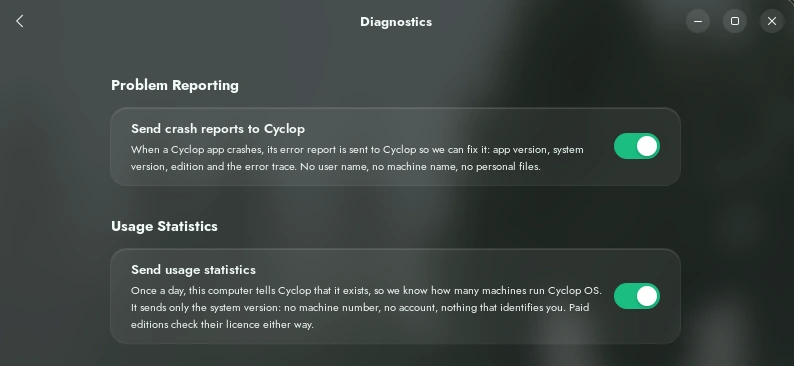
Crash reports: only if you switch them on
When a Cyclop program crashes, you can choose to send us the error so we can fix it. It is the second switch on the Diagnostics page.
- What is sent
- The version of the app, the Cyclop OS version and edition, and the error trace. No user name, no machine name, no files.
- Which crashes
- Only crashes of Cyclop’s own programs. A crash of any other software is never sent.
- Default
- Off. Nothing leaves the machine until you turn it on.
- What we keep
- Reports are deleted after 90 days.
- Switch it on or off
- Settings > Privacy & Security > Privacy > Diagnostics > Send crash reports to Cyclop
This switch arrives with the Patch 3 update; the screenshot above comes from that version.
Paid editions: the licence check
Education, Pro and Gaming check that their licence is still valid. This runs whether or not the switch above is on.
Every six hours (every fifteen minutes during a grace period), the machine asks our licence service whether its licence is still active, so it can keep access to its edition’s repository. The check carries what is needed to tie the machine to the licence you bought, nothing about how you use it.
- What it is for
- Checking the licence, nothing else: it keeps the edition’s repository open and lets a lapsed licence fall back to Community after a grace period.
- Can it be switched off?
- Not from the Diagnostics page, because without it the licence cannot be checked. To stop it, move the machine back to the free Community edition, which only sends the daily version signal above.
- Difference with Community
- Community sends the version only, as a total per day. A paid edition identifies the machine to the licence you bought.
Updates and firmware
Downloads, not reports.
- packages.cyclop-tech.com
- Cyclop packages, signed with our repository key.
- Ubuntu university mirror
- Ubuntu packages and security fixes, from a mirror run by RWTH Aachen University.
- fwupd.org (LVFS)
- Firmware updates, download only. Sending firmware reports is switched off.
- connectivity.cyclop-tech.com
- Tells the system whether it is online. No log kept.
The Ubuntu crash reporters, the Ubuntu Pro prompts and the news in the terminal welcome message are switched off.
Check it yourself
You do not have to take our word for it.
The scheduled jobs Cyclop adds
systemctl list-timers --all | grep -i cyclopWhen each one last ran and when it runs next.
Everything the machine is talking to right now
sudo ss -tunpOne line per open connection, with the remote address and the program behind it.
The long version
Where the software comes from, every connection in detail, and the companies that handle data for us.