
Updates
Keep it current, system and applications.
Two places, on purpose. The system updates in Settings, the applications in Cyclop Store. Here is which does what, and what an error message is really telling you.
The system: Settings, Updates
The page shows what is really waiting, read from the package system itself rather than from a list downloaded some time ago. It also shows the history of what has been installed, and the settings actually in force rather than the ones you believe are.
- Open Settings
- Go to Updates
- Check for updates
- Install what is offered
- Restart if you are asked to. You are only asked when something genuinely needs it
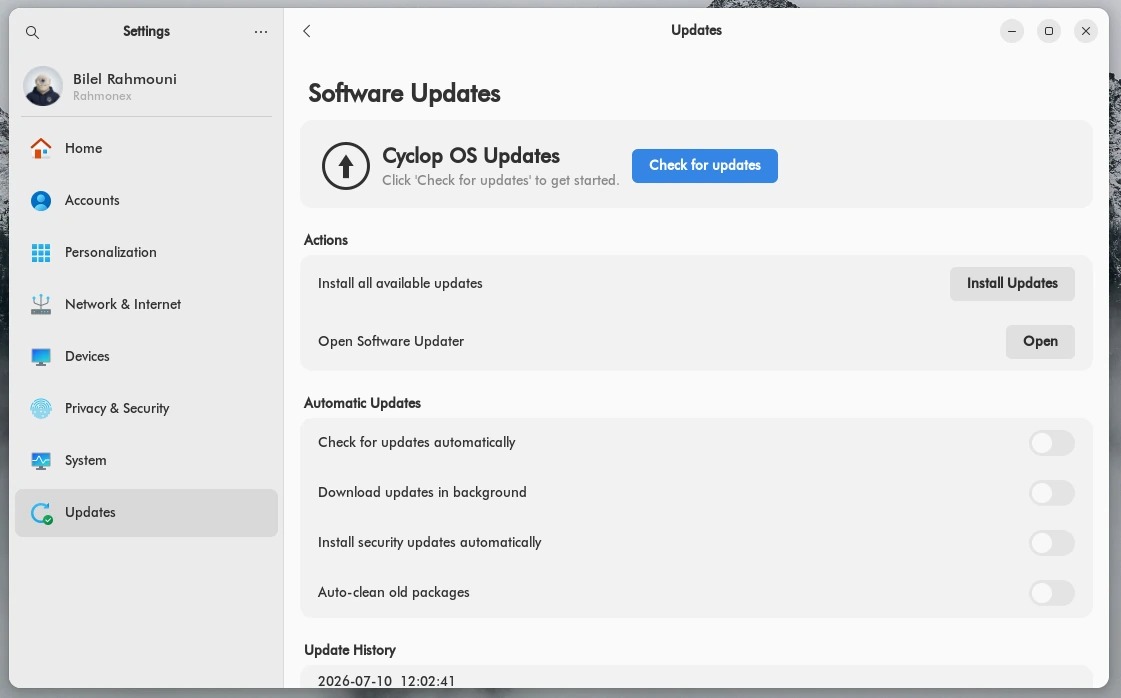
Security updates on their own
Every edition, Community included, ships a preset that applies security updates without asking, from the day the machine is installed. The setting is on the same page, so you can read what is in force instead of guessing.
The applications: Cyclop Store
Cyclop Store has an Updates page of its own, and it updates the applications, one by one or all at once.
System packages and firmware are not there, deliberately. Two places that did the same thing would sooner or later stop saying the same thing.
From the terminal, if you prefer
Everything above can be done with two commands. They do exactly what the Updates page does, because it is the same package system underneath.
- sudo apt update && sudo apt upgrade
- sudo apt autoremove && sudo apt clean, to give back the room taken by packages nothing needs any more
What you should see when it worked
Settings, Updates says the system is up to date and gives the time of the check. The Updates page of the store is empty.
If it does not work
- An error naming packages.cyclop-tech.com, with 401 or 403: that is the licence, not the network. A paid repository asks the machine to identify itself. Go to Settings, Accounts, Subscription.
- An error on an Ubuntu address: that is a mirror or the connection. It is almost always temporary, try again later.
- The check finds nothing although you know something is out: the machine is reading a list downloaded earlier. Run Check for updates again, which refreshes it first.
One thing worth knowing before you go looking for a fault: when a licence is repaired or revoked, the repository keeps its previous answer for about ten minutes. A machine that "still works" right after a change has not defeated anything, it is reading a cache.